IOC容器的初始化
IOC容器的初始化包括BeanDefinition的 Resource定位、载入和注册这三个基本的过程.
我们以ApplicationContext为例讲解,ApplicationContext系列容器也许是我们最熟悉的,因为Web项目中使用的XmlWebApplicationContext就属于这个继承体系,还有ClasspathXmlApplicationContext等,其继承体系如下图所示:

ApplicationContext允许上下文嵌套,通过保持父上下文可以维持一个上下文体系.
对于Bean的查找可以在这个上下文体系中发生,首先检查当前上下文,其次是父上下文,逐级向上,这样为不同的Spring应用提供了一个共享的Bean定义环境.
1.XmlBeanFactory(屌丝IOC)的整个流程
/**
 * @see org.springframework.beans.factory.support.DefaultListableBeanFactory
 * @see XmlBeanDefinitionReader
 * @deprecated as of Spring 3.1 in favor of {@link DefaultListableBeanFactory} and
 * {@link XmlBeanDefinitionReader}
 */
@Deprecated
@SuppressWarnings({"serial", "all"})
public class XmlBeanFactory extends DefaultListableBeanFactory {
    private final XmlBeanDefinitionReader reader = new XmlBeanDefinitionReader(this);

    /**
     * Create a new XmlBeanFactory with the given resource,
     * which must be parsable using DOM.
     */
    public XmlBeanFactory(Resource resource) throws BeansException {
        this(resource, null);
    }

    /**
     * Create a new XmlBeanFactory with the given input stream,
     * which must be parsable using DOM.
     */
    public XmlBeanFactory(Resource resource, BeanFactory parentBeanFactory) throws BeansException {
        super(parentBeanFactory);
        this.reader.loadBeanDefinitions(resource);
    }
}
Bean定位、载入、注册的全过程
// 根据Xml配置文件创建Resource资源对象, 该对象包含了BeanDefinition信息
ClassPathResource resource = new ClassPathResource("application-context.xml");

// 创建DefaultListableBeanFactory
DefaultListableBeanFactory factory = new DefaultListableBeanFactory();

// 创建XmlBeanDefinitionReader读取器,用于加载BeanDefinition
// 之索引需要BeanFactory作为参数, 是因为会将读取的信息回调配置给factory
XmlBeanDefinitionReader reader = new XmlBeanDefinitionReader(factory);

// XmlBeanDefinitionReader执行载入BeanDefinition的方法,最后会完成Bean的载入和注册
// 完成后Bean就成功的防止到IOC容器中,之后就可以从中取得Bean来使用
reader.loadBeanDefinitions(resource);
2 FileSystemXmlApplicationContext的IOC容器流程
2.1 高富帅版IOC解剖
public class FileSystemXmlApplicationContext extends AbstractXmlApplicationContext {
    /**
     * Create a new FileSystemXmlApplicationContext with the given parent,
     * loading the definitions from the given XML files.
     * @param configLocations array of file paths
     * @param refresh whether to automatically refresh the context,
     * loading all bean definitions and creating all singletons.
     * Alternatively, call refresh manually after further configuring the context.
     * @param parent the parent context
     * @throws BeansException if context creation failed
     * @see #refresh()
     */
    public FileSystemXmlApplicationContext(
            String[] configLocations, boolean refresh, @Nullable ApplicationContext parent)
            throws BeansException {

        super(parent);
        setConfigLocations(configLocations);
        if (refresh) {
            refresh();
        }
    }
}
2.2 设置资源加载器和资源定位
通过分析FileSystemXmlApplicationContext的源代码可以知道,在创建FileSystemXmlApplicationContext容器时,构造方法做以下两项重要工作:
- 调用父类容器的构造方法(
super(parent)方法)为容器设置好Bean资源加载器 - 调用父类
AbstractRefreshableConfigApplicationContext的setConfigLocations(configLocations)方法设置Bean定义资源文件的定位路径
通过追踪FileSystemXmlApplicationContext的继承体系,发现其父类的父类AbstractApplicationContext中初始化IOC容器所做的主要源码如下:
public abstract class AbstractApplicationContext extends DefaultResourceLoader
        implements ConfigurableApplicationContext {

    // 静态初始化块,在整个容器创建过程中只执行一次
    static {
        // 为了避免应用程序在WebLogic 8.1关闭时出现类加载异常加载问题,加载IOC容器关闭事件(ContextClosedEvent)类
        ContextClosedEvent.class.getName();
    }

    public AbstractApplicationContext() {
        this.resourcePatternResolver = getResourcePatternResolver();
    }

    public AbstractApplicationContext(@Nullable ApplicationContext parent) {
        this();
        setParent(parent);
    }

    protected ResourcePatternResolver getResourcePatternResolver() {
        // AbstractApplicationContext继承DefaultResourceLoader,因此也是一个资源加载器
        // Spring资源加载器,其getResource(String location)方法用于载入资源
        return new PathMatchingResourcePatternResolver(this);
    }
}
AbstractApplicationContext构造方法中调用PathMatchingResourcePatternResolver的构造方法创建Spring资源加载器:
public PathMatchingResourcePatternResolver(ResourceLoader resourceLoader) {
    Assert.notNull(resourceLoader, "ResourceLoader must not be null");
    // 设置Spring的资源加载器
    this.resourceLoader = resourceLoader;
}
在设置容器的资源加载器之后,接下来FileSystemXmlApplicationContext执行setConfigLocations方法通过调用其父类AbstractRefreshableConfigApplicationContext的方法进行对Bean定义资源文件的定位,该方法的源码如下:
public abstract class AbstractRefreshableConfigApplicationContext extends AbstractRefreshableApplicationContext
    implements BeanNameAware, InitializingBean {

    public void setConfigLocation(String location) {
        // String CONFIG_LOCATION_DELIMITERS = ",; \t\n";
        // 即多个资源文件路径之间用",; \t\n"分割,解析成数组形式
        setConfigLocations(StringUtils.tokenizeToStringArray(location, CONFIG_LOCATION_DELIMITERS));
    }

    /**
     * 解析Bean定义的资源文件的路径, 处理多个资源文件字符串数组
     */
    public void setConfigLocations(@Nullable String... locations) {
        if (locations != null) {
            Assert.noNullElements(locations, "Config locations must not be null");
            // 创建数组
            this.configLocations = new String[locations.length];
            for (int i = 0; i < locations.length; i++) {
                // 解析给定路径
                // 如果路径中包含特殊字符,如 ${var} ,那么在该方法中,会搜寻匹配的系统变量并替换
                this.configLocations[i] = resolvePath(locations[i]).trim();
            }
        } else {
            this.configLocations = null;
        }
    }
}
通过这两个方法的源码我们可以看出,我们既可以使用一个字符串来配置多个SpringBean定义资源文件,也可以使用字符串数组,即下面两种方式都是可以的:
ClasspathResourceres = newClasspathResource("a.xml,b.xml,......");, 多个资源文件路径之间可以是用",;\t\n"等分隔ClasspathResourceres = newClasspathResource(newString[]{"a.xml","b.xml",......});
至此,SpringIOC容器在初始化时将配置的Bean定义资源文件定位为Spring封装的Resource.
2.3 AbstractApplicationContext的refresh函数载入Bean定义过程
SpringIOC容器对Bean定义资源的载入是从refresh()函数开始的.
refresh()是一个模板方法,refresh()方法的作用是: 在创建IOC容器前,如果已经有容器存在,则需要把已有的容器销毁和关闭,以保证在refresh之后使用的是新建立起来的IOC容器.
refresh的作用类似于对IOC容器的重启,在新建立好的容器中对容器进行初始化,对Bean定义资源进行载入.
FileSystemXmlApplicationContext通过调用其父类AbstractApplicationContext的refresh()函数启动整个IOC容器对Bean定义的载入过程:
@Override
public void refresh() throws BeansException, IllegalStateException {
    synchronized (this.startupShutdownMonitor) { // 加锁,避免 #refresh() 和 #close() 方法,自身或者对方并行执行.
        // Prepare this context for refreshing.
        // 准备刷新的上下文, 获取容器的当前时间, 同时给容器设置同步标识
        prepareRefresh();

        // Tell the subclass to refresh the internal bean factory.
        // 初始化 BeanFactory ,并进行 XML 文件读取, Bean定义资源文件的载入从子类的refreshBeanFactory()方法启动
        ConfigurableListableBeanFactory beanFactory = obtainFreshBeanFactory();

        // Prepare the bean factory for use in this context.
        // 对 BeanFactory 配置容器特性, 例如类加载器、时间处理器等
        prepareBeanFactory(beanFactory);

        try {
            // Allows post-processing of the bean factory in context subclasses.
            // 子类覆盖该方法,做 BeanFactory 的额外的处理, 为容器的某些子类指定特殊的BeanPost事件处理器
            postProcessBeanFactory(beanFactory);
            // Invoke factory processors registered as beans in the context.
            // 激活各种 BeanFactory 处理器,例如 BeanFactoryPostProcessor
            invokeBeanFactoryPostProcessors(beanFactory);

            // Register bean processors that intercept bean creation.
            // 注册拦截 Bean 创建的 BeanPostProcessor.这里只是注册,真正的调用在 #getBean(...) 的时,即 Bean 创建的时候.
            // 注意:
            //      1. BeanFactoryPostProcessor 作用于 BeanDefinition
            //      2. BeanPostProcessor 作用于 Bean
            registerBeanPostProcessors(beanFactory);

            // Initialize message source for this context.
            // 初始化信息源, 和国际化相关
            initMessageSource();

            // Initialize event multicaster for this context.
            // 初始化 Application Event Multicaster(容器事件传播器)
            initApplicationEventMulticaster();

            // Initialize other special beans in specific context subclasses.
            // 留给子类,来初始化其他特殊的 Bean 对象们
            onRefresh();

            // Check for listener beans and register them.
            // 注册监听器们
            registerListeners();

            // Instantiate all remaining (non-lazy-init) singletons.
            // 初始化非延迟加载的单例
            finishBeanFactoryInitialization(beanFactory);

            // Last step: publish corresponding event.
            // 完成 refresh 逻辑: 初始化容器的生命周期事件处理器, 并发布容器的生命周期事件
            finishRefresh();
        } catch (BeansException ex) {
            if (logger.isWarnEnabled()) {
                logger.warn("Exception encountered during context initialization - " +
                        "cancelling refresh attempt: " + ex);
            }

            // Destroy already created singletons to avoid dangling resources.
            // 销毁已创建的Bean
            destroyBeans();

            // Reset 'active' flag.
            // 取消refresh操作,重置容器的同步标识
            cancelRefresh(ex);

            // Propagate exception to caller.
            throw ex;
        } finally {
            // Reset common introspection caches in Spring's core, since we
            // might not ever need metadata for singleton beans anymore...
            resetCommonCaches();
        }
    }
}
refresh()方法主要为IOC容器Bean的生命周期管理提供条件.SpringIOC容器载入Bean定义资源文件从其子类容器的refreshBeanFactory()方法启动,所以整个refresh()中"ConfigurableListableBeanFactorybeanFactory = obtainFreshBeanFactory();"这句以后代码的都是注册容器的信息源和生命周期事件,载入过程就是从这句代码启动.
refresh()方法的作用是: 在创建IOC容器前,如果已经有容器存在,则需要把已有的容器销毁和关闭,以保证在refresh之后使用的是新建立起来的IOC容器.
refresh的作用类似于对IOC容器的重启,在新建立好的容器中对容器进行初始化,对Bean定义资源进行载入
2.4 obtainFreshBeanFactory
AbstractApplicationContext的obtainFreshBeanFactory()方法调用子类容器的refreshBeanFactory()方法,启动容器载入Bean定义资源文件的过程,代码如下:
protected ConfigurableListableBeanFactory obtainFreshBeanFactory() {
    // 这里使用了委派设计模式,父类定义了抽象的 refreshBeanFactory()方法,具体实现调用子类容器的refreshBeanFactory()方法
    // 刷新(重建) BeanFactory
    refreshBeanFactory();
    // 获得 BeanFactory
    return getBeanFactory();
}
AbstractApplicationContext类中只抽象定义了refreshBeanFactory()方法,容器真正调用的是其子类AbstractRefreshableApplicationContext实现的refreshBeanFactory()方法,方法的源码如下:
@Override
protected final void refreshBeanFactory() throws BeansException {
    // 若已有 BeanFactory ,销毁它的 Bean 们,并销毁 BeanFactory
    if (hasBeanFactory()) {
        destroyBeans();
        closeBeanFactory();
    }
    try {
        // 创建 BeanFactory 对象
        DefaultListableBeanFactory beanFactory = createBeanFactory();
        // 指定序列化编号
        beanFactory.setSerializationId(getId());
        // 定制 BeanFactory 设置相关属性, 如设置启动参数, 开启注解的自动装配等
        customizeBeanFactory(beanFactory);
        // 加载 BeanDefinition 们, 主要又使用了一个委派模式, 当前类只是定义, 具体的实现调用子类容器
        loadBeanDefinitions(beanFactory);
        // 设置 Context 的 BeanFactory
        synchronized (this.beanFactoryMonitor) {
            this.beanFactory = beanFactory;
        }
    }
    catch (IOException ex) {
        throw new ApplicationContextException("I/O error parsing bean definition source for " + getDisplayName(), ex);
    }
}
在这个方法中,先判断BeanFactory是否存在,如果存在则先销毁beans并关闭beanFactory,接着创建DefaultListableBeanFactory,并调用loadBeanDefinitions(beanFactory)装载bean定义.
2.5 AbstractRefreshableApplicationContext子类的loadBeanDefinitions方法
AbstractRefreshableApplicationContext中只定义了抽象的loadBeanDefinitions方法,容器真正调用的是其子类AbstractXmlApplicationContext对该方法的实现,AbstractXmlApplicationContext的主要源码如下:
loadBeanDefinitions方法同样是抽象方法,是由其子类实现的,也即在AbstractXmlApplicationContext中.
public abstract class AbstractXmlApplicationContext extends AbstractRefreshableConfigApplicationContext {
    /**
     * Loads the bean definitions via an XmlBeanDefinitionReader.
     * 实现父类抽象的载入Bean 定义方法
     * @see org.springframework.beans.factory.xml.XmlBeanDefinitionReader
     * @see #initBeanDefinitionReader
     * @see #loadBeanDefinitions
     */
    @Override
    protected void loadBeanDefinitions(DefaultListableBeanFactory beanFactory) throws BeansException, IOException {
        // Create a new XmlBeanDefinitionReader for the given BeanFactory.
        // 创建 XmlBeanDefinitionReader 对象, 即创建Bean读取器,并通过回调设置到容器中去, 容器使用该读取器读取Bean定义资源
        XmlBeanDefinitionReader beanDefinitionReader = new XmlBeanDefinitionReader(beanFactory);

        // Configure the bean definition reader with this context's
        // resource loading environment.
        // 对 XmlBeanDefinitionReader 进行环境变量的设置
        beanDefinitionReader.setEnvironment(this.getEnvironment());
        // 为Bean读取器设置Spring资源加载器,AbstractXmlApplicationContext的祖先父类AbstractApplicationContext继承DefaultResourceLoader,因此容器本身也是一个资源加载器
        beanDefinitionReader.setResourceLoader(this);
        // 为Bean 读取器设置SAX xml解析器
        beanDefinitionReader.setEntityResolver(new ResourceEntityResolver(this));

        // Allow a subclass to provide custom initialization of the reader,
        // then proceed with actually loading the bean definitions.
        // 对 XmlBeanDefinitionReader 进行设置,启用Xml的校验机制, 可以进行覆盖
        initBeanDefinitionReader(beanDefinitionReader);

        // Bean 读取器真正实现加载的方法: 从 Resource 们中,加载 BeanDefinition 们
        loadBeanDefinitions(beanDefinitionReader);
    }

    protected void initBeanDefinitionReader(XmlBeanDefinitionReader reader) {
        reader.setValidating(this.validating);
    }

    /**
     * Xml Bean 读取器加载Bean 定义资源
     * @param reader the XmlBeanDefinitionReader to use
     * @see #refreshBeanFactory
     * @see #getConfigLocations
     * @see #getResources
     * @see #getResourcePatternResolver
     */
    protected void loadBeanDefinitions(XmlBeanDefinitionReader reader) throws BeansException, IOException {
        // 从配置文件 Resource 中,加载 BeanDefinition们
        Resource[] configResources = getConfigResources();
        if (configResources != null) {
            // Xml Bean 读取器调用其父类 AbstractBeanDefinitionReader 读取定位的 Bean 定义资源
            reader.loadBeanDefinitions(configResources);
        }
        // 从配置文件地址中,加载 BeanDefinition 们
        // 如果子类中获取的 Bean 定义资源定位为空, 则获取 FileSystemXmlApplicationContext 构造方法中的 setConfigLocations 方法设置的资源
        String[] configLocations = getConfigLocations();
        if (configLocations != null) {
            // Xml Bean 读取器调用其父类 AbstractBeanDefinitionReader 读取定位的 Bean 定义资源
            reader.loadBeanDefinitions(configLocations);
        }
    }

    /**
     * 使用委派模式, 调用子类的获取Bean 定义资源定位的方法,该方法在 ClassPathXmlApplicationContext 中实现
     * 对于我们举例分析源码的 FileSystemXmlApplicationContext 没有使用该方法
     */
    @Nullable
    protected Resource[] getConfigResources() {
        return null;
    }
}
XmlBean读取器(XmlBeanDefinitionReader)调用其父类AbstractBeanDefinitionReader的reader.loadBeanDefinitions方法读取Bean定义资源.
由于我们使用FileSystemXmlApplicationContext作为例子分析,因此getConfigResources的返回值为null,因此程序执行reader.loadBeanDefinitions(configLocations)分支.
2.6 AbstractBeanDefinitionReader读取Bean定义资源,在其抽象父类AbstractBeanDefinitionReader中定义了载入过程
AbstractBeanDefinitionReader的loadBeanDefinitions方法源码如下:
public abstract class AbstractBeanDefinitionReader implements BeanDefinitionReader, EnvironmentCapable {
    // 重载方法, 调用下面的 loadBeanDefinitions(String, Set<Resource>) 方法
    @Override
    public int loadBeanDefinitions(String location) throws BeanDefinitionStoreException {
        return loadBeanDefinitions(location, null);
    }

    public int loadBeanDefinitions(String location, @Nullable Set<Resource> actualResources) throws BeanDefinitionStoreException {
        // 获得在IOC 容器初始化过程中设置的 ResourceLoader 资源加载器对象
        ResourceLoader resourceLoader = getResourceLoader();
        if (resourceLoader == null) {
            throw new BeanDefinitionStoreException(
                    "Cannot load bean definitions from location [" + location + "]: no ResourceLoader available");
        }

        if (resourceLoader instanceof ResourcePatternResolver) {
            // Resource pattern matching available.
            try {
                // 将指定位置的 Bean 定义资源文件解析为Spring IOC 容器封装的资源,加载多个指定位置的Bean 定义资源文件
                // 获得 Resource 数组,因为 Pattern 模式匹配下,可能有多个 Resource .例如说,Ant 风格的 location
                Resource[] resources = ((ResourcePatternResolver) resourceLoader).getResources(location);
                // 委派调用其子类 XmlBeanDefinitionReader 的方法, 加载 BeanDefinition 们
                int count = loadBeanDefinitions(resources);
                // 添加到 actualResources 中
                if (actualResources != null) {
                    Collections.addAll(actualResources, resources);
                }
                if (logger.isTraceEnabled()) {
                    logger.trace("Loaded " + count + " bean definitions from location pattern [" + location + "]");
                }
                return count;
            } catch (IOException ex) {
                throw new BeanDefinitionStoreException(
                        "Could not resolve bean definition resource pattern [" + location + "]", ex);
            }
        } else {
            // Can only load single resources by absolute URL.
            // 加载单个指定位置的 Bean 定义资源文件, 获得 Resource 对象,
            Resource resource = resourceLoader.getResource(location);
            // 加载 BeanDefinition 们
            int count = loadBeanDefinitions(resource);
            // 添加到 actualResources 中
            if (actualResources != null) {
                actualResources.add(resource);
            }
            if (logger.isTraceEnabled()) {
                logger.trace("Loaded " + count + " bean definitions from location [" + location + "]");
            }
            return count;
        }
    }

    /**
     * 重载方法, 调用 loadBeanDefinitions(String);
     */
    @Override
    public int loadBeanDefinitions(String... locations) throws BeanDefinitionStoreException {
        Assert.notNull(locations, "Location array must not be null");
        int count = 0;
        for (String location : locations) {
            count += loadBeanDefinitions(location);
        }
        return count;
    }
}
loadBeanDefinitions(Resource...resources)方法和上面分析的3个方法类似,同样也是调用XmlBeanDefinitionReader的loadBeanDefinitions方法.
从对AbstractBeanDefinitionReader的loadBeanDefinitions方法源码分析可以看出该方法做了以下两件事:
- 调用资源加载器的获取资源方法
resourceLoader.getResource(location),获取到要加载的资源. - 真正执行加载功能是其子类
XmlBeanDefinitionReader的loadBeanDefinitions方法.
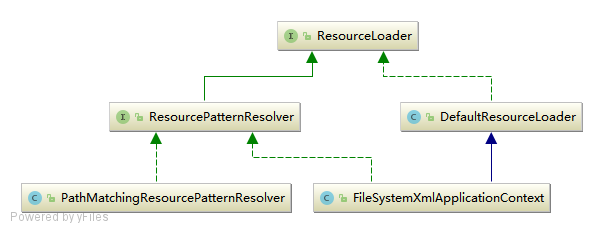
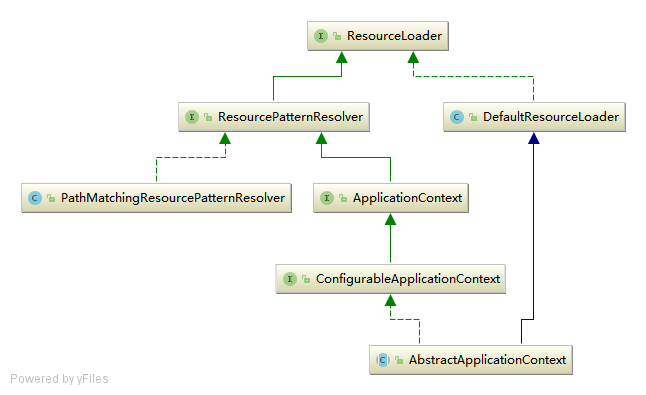
看到上面的ResourceLoader与ApplicationContext的继承系图,可以知道其实际调用的是DefaultResourceLoader中的getSource()方法定位Resource,因为FileSystemXmlApplicationContext本身就是DefaultResourceLoader的实现类,所以此时又回到了FileSystemXmlApplicationContext中来.
2.7 资源加载器获取要读入的资源
XmlBeanDefinitionReader通过调用其父类DefaultResourceLoader的getResource方法获取要加载的资源,其源码如下:
public class DefaultResourceLoader implements ResourceLoader {
    // ResourceLoader 中最核心的方法为 `#getResource()` ,它根据提供的 location 返回相应的 Resource
    // 而 DefaultResourceLoader 对该方法提供了**核心实现**
    // (因为,它的两个子类都没有提供覆盖该方法,所以可以断定 ResourceLoader 的资源加载策略就封装在 DefaultResourceLoader 中)
    @Override
    public Resource getResource(String location) {
        Assert.notNull(location, "Location must not be null");

        // 首先,通过 ProtocolResolver 来加载资源
        for (ProtocolResolver protocolResolver : this.protocolResolvers) {
            Resource resource = protocolResolver.resolve(location, this);
            if (resource != null) {
                return resource;
            }
        }
        // 其次,以 / 开头,返回 ClassPathContextResource 类型的资源
        if (location.startsWith("/")) {
            return getResourceByPath(location);
        // 再次,以 classpath: 开头,返回 ClassPathResource 类型的资源
        } else if (location.startsWith(CLASSPATH_URL_PREFIX)) {
            return new ClassPathResource(location.substring(CLASSPATH_URL_PREFIX.length()), getClassLoader());
        // 然后,根据是否为文件 URL ,是则返回 FileUrlResource 类型的资源,否则返回 UrlResource 类型的资源
        } else {
            try {
                // Try to parse the location as a URL...
                // 如果是 URL 方式, 使用UrlResource 作为 bean 文件的资源对象
                URL url = new URL(location);
                return (ResourceUtils.isFileURL(url) ? new FileUrlResource(url) : new UrlResource(url));
            } catch (MalformedURLException ex) {
                // 最后,返回 ClassPathContextResource 类型的资源
                // No URL -> resolve as resource path.
                return getResourceByPath(location);
            }
        }
    }
}
FileSystemXmlApplicationContext容器提供了getResourceByPath方法的实现,就是为了处理既不是classpath标识,又不是URL标识的Resource定位这种情况.
public class FileSystemXmlApplicationContext extends AbstractXmlApplicationContext {
    @Override
    protected Resource getResourceByPath(String path) {
        if (path.startsWith("/")) {
            path = path.substring(1);
        }
        // 使用文件系统资源对象来定义 bean 文件
        return new FileSystemResource(path);
    }
}
这样代码就回到了FileSystemXmlApplicationContext中来,他提供了FileSystemResource来完成从文件系统得到配置文件的资源定义.
这样,就可以从文件系统路径上对IOC配置文件进行加载,当然我们可以按照这个逻辑从任何地方加载,在Spring中我们看到它提供的各种资源抽象,比如ClassPathResource,URLResource,FileSystemResource等来供我们使用.上面我们看到的是定位Resource的一个过程,而这只是加载过程的一部分.
2.8 XmlBeanDefinitionReader加载Bean定义资源
继续回到XmlBeanDefinitionReader的loadBeanDefinitions(Resource...)方法看到代表bean文件的资源定义以后的载入过程.
public class XmlBeanDefinitionReader extends AbstractBeanDefinitionReader {
    /**
     * XmlBeanDefinitionReader 加载资源的入口方法
     * Load bean definitions from the specified XML file.
     * @param resource the resource descriptor for the XML file
     * @return the number of bean definitions found
     * @throws BeanDefinitionStoreException in case of loading or parsing errors
     */
    @Override
    public int loadBeanDefinitions(Resource resource) throws BeanDefinitionStoreException {
        return loadBeanDefinitions(new EncodedResource(resource));
    }

    /**
     * 这里是载入 XML 形式 Bean 定义资源文件方法
     * Load bean definitions from the specified XML file.
     * @param encodedResource the resource descriptor for the XML file,
     * allowing to specify an encoding to use for parsing the file
     * @return the number of bean definitions found
     * @throws BeanDefinitionStoreException in case of loading or parsing errors
     */
    public int loadBeanDefinitions(EncodedResource encodedResource) throws BeanDefinitionStoreException {
        Assert.notNull(encodedResource, "EncodedResource must not be null");
        if (logger.isTraceEnabled()) {
            logger.trace("Loading XML bean definitions from " + encodedResource);
        }

        // 获取已经加载过的资源
        Set<EncodedResource> currentResources = this.resourcesCurrentlyBeingLoaded.get();
        if (currentResources == null) {
            currentResources = new HashSet<>(4);
            this.resourcesCurrentlyBeingLoaded.set(currentResources);
        }
        // 将当前资源加入记录中.如果已存在,抛出异常
        if (!currentResources.add(encodedResource)) {
            throw new BeanDefinitionStoreException("Detected cyclic loading of " + encodedResource + " - check your import definitions!");
        }
        try {
            // 从 EncodedResource 获取封装的 Resource ,并从 Resource 中获取其中的 InputStream
            InputStream inputStream = encodedResource.getResource().getInputStream();
            try {
                InputSource inputSource = new InputSource(inputStream);
                if (encodedResource.getEncoding() != null) {
                    // 设置编码
                    inputSource.setEncoding(encodedResource.getEncoding());
                }
                // 核心逻辑部分,执行加载 BeanDefinition
                return doLoadBeanDefinitions(inputSource, encodedResource.getResource());
            } finally {
                //  关闭从 Resource 中得到的 IO 流
                inputStream.close();
            }
        } catch (IOException ex) {
            throw new BeanDefinitionStoreException("IOException parsing XML document from " + encodedResource.getResource(), ex);
        } finally {
            // 从缓存中剔除该资源
            currentResources.remove(encodedResource);
            if (currentResources.isEmpty()) {
                this.resourcesCurrentlyBeingLoaded.remove();
            }
        }
    }

    /**
     * 从特定 XML 文件中实际载入 Bean 定义资源的方法
     * Actually load bean definitions from the specified XML file.
     * @param inputSource the SAX InputSource to read from
     * @param resource the resource descriptor for the XML file
     * @return the number of bean definitions found
     * @throws BeanDefinitionStoreException in case of loading or parsing errors
     * @see #doLoadDocument
     * @see #registerBeanDefinitions
     */
    protected int doLoadBeanDefinitions(InputSource inputSource, Resource resource)
            throws BeanDefinitionStoreException {
        try {
            // 获取 XML Document 实例, 将XML文件转换成DOM对象, 解析过程由 documentLoader 实现
            Document doc = doLoadDocument(inputSource, resource);
            // 根据 Document 实例,注册 Bean 信息
            // 这里是启动对 Bean 定义解析的相信过程, 改解析过程会用到 Spring 的 Bean 配置规则
            int count = registerBeanDefinitions(doc, resource);
            if (logger.isDebugEnabled()) {
                logger.debug("Loaded " + count + " bean definitions from " + resource);
            }
            return count;
        } catch (BeanDefinitionStoreException ex) {
            throw ex;
        } catch (SAXParseException ex) {
            throw new XmlBeanDefinitionStoreException(resource.getDescription(),
                    "Line " + ex.getLineNumber() + " in XML document from " + resource + " is invalid", ex);
        } catch (SAXException ex) {
            throw new XmlBeanDefinitionStoreException(resource.getDescription(),
                    "XML document from " + resource + " is invalid", ex);
        } catch (ParserConfigurationException ex) {
            throw new BeanDefinitionStoreException(resource.getDescription(),
                    "Parser configuration exception parsing XML from " + resource, ex);
        } catch (IOException ex) {
            throw new BeanDefinitionStoreException(resource.getDescription(),
                    "IOException parsing XML document from " + resource, ex);
        } catch (Throwable ex) {
            throw new BeanDefinitionStoreException(resource.getDescription(),
                    "Unexpected exception parsing XML document from " + resource, ex);
        }
    }
}
通过源码分析,载入Bean定义资源文件的最后一步是将Bean定义资源转换为Document对象,该过程由documentLoader实现
2.9 DocumentLoader将Bean定义资源转换为Document对象
DocumentLoader将Bean定义资源转换成Document对象的源码如下:
public class DefaultDocumentLoader implements DocumentLoader {
    /**
     * 使用标准的JAX 加载 Document 对象
     */
    @Override
    public Document loadDocument(InputSource inputSource, EntityResolver entityResolver,
            ErrorHandler errorHandler, int validationMode, boolean namespaceAware) throws Exception {
                // 创建 DocumentBuilderFactory
        DocumentBuilderFactory factory = createDocumentBuilderFactory(validationMode, namespaceAware);
        if (logger.isTraceEnabled()) {
            logger.trace("Using JAXP provider [" + factory.getClass().getName() + "]");
        }
        // 创建 DocumentBuilder
        DocumentBuilder builder = createDocumentBuilder(factory, entityResolver, errorHandler);
        // 解析 XML InputSource 返回 Document 对象
        return builder.parse(inputSource);
    }

    /**
     * 创建 DocumentBuilderFactory 对象
     *
     * Create the {@link DocumentBuilderFactory} instance.
     * @param validationMode the type of validation: {@link XmlValidationModeDetector#VALIDATION_DTD DTD}
     * or {@link XmlValidationModeDetector#VALIDATION_XSD XSD})
     * @param namespaceAware whether the returned factory is to provide support for XML namespaces
     * @return the JAXP DocumentBuilderFactory
     * @throws ParserConfigurationException if we failed to build a proper DocumentBuilderFactory
     */
    protected DocumentBuilderFactory createDocumentBuilderFactory(int validationMode, boolean namespaceAware)
            throws ParserConfigurationException {
        // 创建 DocumentBuilderFactory 文档解析工厂
        DocumentBuilderFactory factory = DocumentBuilderFactory.newInstance();
        // 设置命名空间支持
        factory.setNamespaceAware(namespaceAware);

        if (validationMode != XmlValidationModeDetector.VALIDATION_NONE) {
            // 开启校验
            factory.setValidating(true);
            // XSD 模式下,设置 factory 的属性
            if (validationMode == XmlValidationModeDetector.VALIDATION_XSD) {
                // Enforce namespace aware for XSD...
                // XSD 模式下,强制设置命名空间支持
                factory.setNamespaceAware(true);
                // 设置 SCHEMA_LANGUAGE_ATTRIBUTE
                try {
                    factory.setAttribute(SCHEMA_LANGUAGE_ATTRIBUTE, XSD_SCHEMA_LANGUAGE);
                } catch (IllegalArgumentException ex) {
                    ParserConfigurationException pcex = new ParserConfigurationException(
                            "Unable to validate using XSD: Your JAXP provider [" + factory +
                            "] does not support XML Schema. Are you running on Java 1.4 with Apache Crimson? " +
                            "Upgrade to Apache Xerces (or Java 1.5) for full XSD support.");
                    pcex.initCause(ex);
                    throw pcex;
                }
            }
        }

        return factory;
    }
}
该解析过程调用JavaEE标准的JAXP标准进行处理. 至此SpringIOC容器根据定位的Bean定义资源文件,将其加载读入并转换成为Document对象过程完成.
接下来我们要继续分析SpringIOC容器将载入的Bean定义资源文件转换为Document对象之后,是如何将其解析为SpringIOC管理的Bean对象并将其注册到容器中的.
2.10 XmlBeanDefinitionReader解析载入的Bean定义资源文件
XmlBeanDefinitionReader类中的doLoadBeanDefinitions方法是从特定XML文件中实际载入Bean定义资源的方法,该方法在载入Bean定义资源之后将其转换为Document对象,接下来调用registerBeanDefinitions启动Spring IOC容器对Bean定义的解析过程,registerBeanDefinitions方法源码如下:
public class XmlBeanDefinitionReader extends AbstractBeanDefinitionReader {
    /**
     * 根据获取的 Document 实例,按照Spring的Bean语义要求将 Bean 定义资源解析并转换为容器内部数据结构
     */
    public int registerBeanDefinitions(Document doc, Resource resource) throws BeanDefinitionStoreException {
        // 创建 BeanDefinitionDocumentReader 对象来对 xml 格式的 BeanDefinition 解析
        BeanDefinitionDocumentReader documentReader = createBeanDefinitionDocumentReader();
        // 获取已注册的 BeanDefinition 数量
        int countBefore = getRegistry().getBeanDefinitionCount();
        // 解析过程入口, 这里使用了委派模式, BeanDefinitionDocumentReader 只是个接口,具体的解析实现过程由实现类 DefaultBeanDefinitionDocumentReader 完成
        // 创建 XmlReaderContext 对象, 注册 BeanDefinition
        documentReader.registerBeanDefinitions(doc, createReaderContext(resource));
        // 计算新注册的 BeanDefinition 数量
        return getRegistry().getBeanDefinitionCount() - countBefore;
    }
}
Bean定义资源的载入解析分为以下两个过程:
- 通过调用XML解析器将Bean定义资源文件转换得到
Document对象,但是这些Document对象并没有按照Spring的Bean规则进行解析.这一步是载入的过程 - 在完成通用的XML解析之后,按照Spring的Bean规则对Document对象进行解析
按照Spring的Bean规则对Document对象解析的过程是在接口BeanDefinitionDocumentReader的实现类DefaultBeanDefinitionDocumentReader中实现的.
2.11 DefaultBeanDefinitionDocumentReader对Bean定义的Document对象解析
BeanDefinitionDocumentReader接口通过registerBeanDefinitions方法调用其实现类DefaultBeanDefinitionDocumentReader对Document对象进行解析,解析的代码如下:
public class DefaultBeanDefinitionDocumentReader implements BeanDefinitionDocumentReader {

    @Override
    public void registerBeanDefinitions(Document doc, XmlReaderContext readerContext) {
        this.readerContext = readerContext;
        // 获得 XML Document Root Element
        // 执行注册 BeanDefinition
        doRegisterBeanDefinitions(doc.getDocumentElement());
    }

    protected void doRegisterBeanDefinitions(Element root) {
        // 记录老的 BeanDefinitionParserDelegate 对象, BeanDefinitionParserDelegate中定义了Spring Bean 定义XML文件的各种元素
        BeanDefinitionParserDelegate parent = this.delegate;
        // 创建 BeanDefinitionParserDelegate 对象,并进行设置到 delegate
        this.delegate = createDelegate(getReaderContext(), root, parent);
        //检查 <beans /> 根标签的命名空间是否为空,或者是 http://www.springframework.org/schema/beans
        if (this.delegate.isDefaultNamespace(root)) {
            // 处理 profile 属性.可参见《Spring3自定义环境配置 <beans profile="">》http://nassir.iteye.com/blog/1535799
            String profileSpec = root.getAttribute(PROFILE_ATTRIBUTE);
            if (StringUtils.hasText(profileSpec)) {
                // 使用分隔符切分,可能有多个 profile.
                String[] specifiedProfiles = StringUtils.tokenizeToStringArray(
                        profileSpec, BeanDefinitionParserDelegate.MULTI_VALUE_ATTRIBUTE_DELIMITERS);
                // 如果所有 profile 都无效,则不进行注册
                // We cannot use Profiles.of(...) since profile expressions are not supported
                // in XML config. See SPR-12458 for details.
                if (!getReaderContext().getEnvironment().acceptsProfiles(specifiedProfiles)) {
                    if (logger.isDebugEnabled()) {
                        logger.debug("Skipped XML bean definition file due to specified profiles [" + profileSpec +
                                "] not matching: " + getReaderContext().getResource());
                    }
                    return;
                }
            }
        }

        // 解析前处理, 在解析Bean定义之前,进行自定义的解析,增强了解析过程的可扩展性
        preProcessXml(root);
        // 解析,从Document的根元素开始进行Bean定义的Document对象
        parseBeanDefinitions(root, this.delegate);
        // 解析后处理
        postProcessXml(root);

        // 设置 delegate 回老的 BeanDefinitionParserDelegate 对象
        this.delegate = parent;
    }

    /**
     * 创建BeanDefinitionParserDelegate, 用于完成真正的解析过程
     */
    protected BeanDefinitionParserDelegate createDelegate(
            XmlReaderContext readerContext, Element root, @Nullable BeanDefinitionParserDelegate parentDelegate) {
        // 创建 BeanDefinitionParserDelegate 对象
        BeanDefinitionParserDelegate delegate = new BeanDefinitionParserDelegate(readerContext);
        // 初始化Document根元素
        delegate.initDefaults(root, parentDelegate);
        return delegate;
    }

    /**
     * 使用Spring的Bean规则从 Document的根元素开始进行Bean定义的Document对象
     */
    protected void parseBeanDefinitions(Element root, BeanDefinitionParserDelegate delegate) {
        // 如果根节点使用默认命名空间,执行默认解析
        if (delegate.isDefaultNamespace(root)) {
            // 遍历子节点
            NodeList nl = root.getChildNodes();
            for (int i = 0; i < nl.getLength(); i++) {
                Node node = nl.item(i);
                // 获得Document 节点是XML元素节点
                if (node instanceof Element) {
                    Element ele = (Element) node;
                    // 如果该节点使用默认命名空间,执行默认解析
                    if (delegate.isDefaultNamespace(ele)) {
                        parseDefaultElement(ele, delegate);
                    // 如果该节点非默认命名空间,执行自定义解析, 使用用户自定义的解析规则解析元素节点
                    } else {
                        delegate.parseCustomElement(ele);
                    }
                }
            }
        // 如果根节点非默认命名空间,执行自定义解析
        } else {
            delegate.parseCustomElement(root);
        }
    }

    /**
     * 使用Spring的Bean规则解析Document元素节点
     */
    private void parseDefaultElement(Element ele, BeanDefinitionParserDelegate delegate) {
        // 如果元素节点是<Import>导入元素, 进行导入解析
        if (delegate.nodeNameEquals(ele, IMPORT_ELEMENT)) {
            importBeanDefinitionResource(ele);
        }
        // 如果元素节点是<Alias>别名元素, 进行别名解析
        else if (delegate.nodeNameEquals(ele, ALIAS_ELEMENT)) {
            processAliasRegistration(ele);
        }
        // 元素节点既不是导入元素,也不是别名元素, 即普通的<Bean>元素, 按照Spring的Bean规则解析元素
        else if (delegate.nodeNameEquals(ele, BEAN_ELEMENT)) {
            processBeanDefinition(ele, delegate);
        }
        // beans
        else if (delegate.nodeNameEquals(ele, NESTED_BEANS_ELEMENT)) {
            // recurse
            doRegisterBeanDefinitions(ele);
        }
    }

    /**
     * 解析<Import>导入元素, 从给定的导入路径加载Bean定义资源到Spring IOC容器中
     * Parse an "import" element and load the bean definitions
     * from the given resource into the bean factory.
     */
    protected void importBeanDefinitionResource(Element ele) {
        // 获取 resource 的属性值
        String location = ele.getAttribute(RESOURCE_ATTRIBUTE);
        // 为空,直接退出
        if (!StringUtils.hasText(location)) {
            // 使用 problemReporter 报错
            getReaderContext().error("Resource location must not be empty", ele);
            return;
        }

        // 使用系统变量解析location属性值,格式如 :"${user.dir}"
        // Resolve system properties: e.g. "${user.dir}"
        location = getReaderContext().getEnvironment().resolveRequiredPlaceholders(location);

        // 实际 Resource 集合,即 import 的地址,有哪些 Resource 资源
        Set<Resource> actualResources = new LinkedHashSet<>(4);

        // 判断 location 是相对路径还是绝对路径
        // Discover whether the location is an absolute or relative URI
        boolean absoluteLocation = false;
        try {
            absoluteLocation = ResourcePatternUtils.isUrl(location) || ResourceUtils.toURI(location).isAbsolute();
        } catch (URISyntaxException ex) {
            // cannot convert to an URI, considering the location relative
            // unless it is the well-known Spring prefix "classpath*:"
        }

        // Absolute or relative?
        // 绝对路径
        if (absoluteLocation) {
            try {
                // 添加配置文件地址的 Resource 到 actualResources 中,并加载相应的 BeanDefinition 们
                int importCount = getReaderContext().getReader().loadBeanDefinitions(location, actualResources);
                if (logger.isTraceEnabled()) {
                    logger.trace("Imported " + importCount + " bean definitions from URL location [" + location + "]");
                }
            } catch (BeanDefinitionStoreException ex) {
                getReaderContext().error(
                        "Failed to import bean definitions from URL location [" + location + "]", ele, ex);
            }
        // 相对路径
        } else {
            // No URL -> considering resource location as relative to the current file.
            // 给定的导入元素的 location 是相对路径
            try {
                int importCount;
                // 创建相对地址的 Resource, 将给定导入元素的location封装为相对路径资源
                Resource relativeResource = getReaderContext().getResource().createRelative(location);
                // 存在
                if (relativeResource.exists()) {
                    // 加载 relativeResource 中的 BeanDefinition 们
                    importCount = getReaderContext().getReader().loadBeanDefinitions(relativeResource);
                    // 添加到 actualResources 中
                    actualResources.add(relativeResource);
                // 不存在
                } else {
                    // 获取Spring IOC容器资源读入器的基本路径
                    String baseLocation = getReaderContext().getResource().getURL().toString();
                    // 添加配置文件地址的 Resource 到 actualResources 中,并加载相应的 BeanDefinition 们
                    importCount = getReaderContext().getReader().loadBeanDefinitions(
                            /* 计算绝对路径 */
                            StringUtils.applyRelativePath(baseLocation, location),
                            actualResources);
                }
                if (logger.isTraceEnabled()) {
                    logger.trace("Imported " + importCount + " bean definitions from relative location [" + location + "]");
                }
            } catch (IOException ex) {
                getReaderContext().error("Failed to resolve current resource location", ele, ex);
            } catch (BeanDefinitionStoreException ex) {
                getReaderContext().error(
                        "Failed to import bean definitions from relative location [" + location + "]", ele, ex);
            }
        }
        // 解析<Import>元素成功后,进行监听器激活处理: 发送容器导入其它资源处理完成事件
        Resource[] actResArray = actualResources.toArray(new Resource[0]);
        getReaderContext().fireImportProcessed(location, actResArray, extractSource(ele));
    }

    /**
     * 解析<Alias>别名元素, 为Bean想Spring IOC 容器注册别名
     * Process the given alias element, registering the alias with the registry.
     */
    protected void processAliasRegistration(Element ele) {
        // 获取<Alias>别名元素中name的属性值
        String name = ele.getAttribute(NAME_ATTRIBUTE);
        // 获取<Alias>别名元素中alias的属性值
        String alias = ele.getAttribute(ALIAS_ATTRIBUTE);
        boolean valid = true;
        // <Alias>别名元素中name属性值为空
        if (!StringUtils.hasText(name)) {
            getReaderContext().error("Name must not be empty", ele);
            valid = false;
        }
        // <Alias>别名元素中alias属性值为空
        if (!StringUtils.hasText(alias)) {
            getReaderContext().error("Alias must not be empty", ele);
            valid = false;
        }
        if (valid) {
            try {
                // 向容器的资源读入器注册别名
                getReaderContext().getRegistry().registerAlias(name, alias);
            }
            catch (Exception ex) {
                getReaderContext().error("Failed to register alias '" + alias +
                        "' for bean with name '" + name + "'", ele, ex);
            }
            // 在解析完<Alias>元素之后, 发送容器别名处理完成事件
            getReaderContext().fireAliasRegistered(name, alias, extractSource(ele));
        }
    }

    /**
     * 解析Bean定义资源Document对象的普通对象
     * Process the given bean element, parsing the bean definition
     * and registering it with the registry.
     */
    protected void processBeanDefinition(Element ele, BeanDefinitionParserDelegate delegate) {
        // BeanDefinitionHolder 是对 BeanDefinition 的封装, 即Bean定义的封装类, 为 name 和 alias 的 BeanDefinition 对象
        // 进行 bean 元素解析
        // 如果解析成功,则返回 BeanDefinitionHolder 对象
        // 如果解析失败,则返回 null
        BeanDefinitionHolder bdHolder = delegate.parseBeanDefinitionElement(ele);
        if (bdHolder != null) {
            // 进行自定义标签处理
            bdHolder = delegate.decorateBeanDefinitionIfRequired(ele, bdHolder);
            try {
                // 进行 BeanDefinition 的注册
                // 向Spring IOC 容器注册解析得到的Bean定义, 这是 Bean 定义向IOC容器注册的入口
                // Register the final decorated instance.
                BeanDefinitionReaderUtils.registerBeanDefinition(bdHolder, getReaderContext().getRegistry());
            } catch (BeanDefinitionStoreException ex) {
                getReaderContext().error("Failed to register bean definition with name '" +
                        bdHolder.getBeanName() + "'", ele, ex);
            }
            // 发出响应事件,通知相关的监听器,已完成该 Bean 标签的解析.
            // Send registration event.
            getReaderContext().fireComponentRegistered(new BeanComponentDefinition(bdHolder));
        }
    }
}
通过上述Spring IOC容器对载入的Bean定义Document解析可以看出,我们使用Spring时,在Spring配置文件中可以使用<import>元素来导入IOC容器所需要的其他资源,Spring IOC容器在解析时会首先将指定导入的资源加载进容器中.使用<ailas>别名时,SpringIOC容器首先将别名元素所定义的别名注册到容器中.
对于既不是<import>元素,又不是<alias>元素的元素,即Spring配置文件中普通的<bean>元素的解析由BeanDefinitionParserDelegate类的parseBeanDefinitionElement方法来实现.
2.12 BeanDefinitionParserDelegate解析Bean定义资源文件中的元素
Bean定义资源文件中的<import>和<alias>元素解析在DefaultBeanDefinitionDocumentReader中已经完成,对Bean定义资源文件中使用最多的<bean>元素交由BeanDefinitionParserDelegate来解析,其解析实现的源码如下:
public class BeanDefinitionParserDelegate {
    /**
     * 解析<Bean>元素的入口
     * Parses the supplied {@code <bean>} element. May return {@code null}
     * if there were errors during parse. Errors are reported to the
     * {@link org.springframework.beans.factory.parsing.ProblemReporter}.
     */
    @Nullable
    public BeanDefinitionHolder parseBeanDefinitionElement(Element ele) {
        return parseBeanDefinitionElement(ele, null);
    }

    /**
     * 解析Bean定义资源文件中的<Bean>元素, 这个方法中主要处理<Bean>元素的id, name 和别名属性
     * Parses the supplied {@code <bean>} element. May return {@code null}
     * if there were errors during parse. Errors are reported to the
     * {@link org.springframework.beans.factory.parsing.ProblemReporter}.
     */
    @Nullable
    public BeanDefinitionHolder parseBeanDefinitionElement(Element ele, @Nullable BeanDefinition containingBean) {
        // 解析 id 和 name 属性
        String id = ele.getAttribute(ID_ATTRIBUTE);
        String nameAttr = ele.getAttribute(NAME_ATTRIBUTE);

        // 计算别名集合
        List<String> aliases = new ArrayList<>();
        // 将<Bean>元素中的所有name属性值存放到别名中
        if (StringUtils.hasLength(nameAttr)) {
            String[] nameArr = StringUtils.tokenizeToStringArray(nameAttr, MULTI_VALUE_ATTRIBUTE_DELIMITERS);
            aliases.addAll(Arrays.asList(nameArr));
        }

        // beanName ,优先,使用 id
        String beanName = id;
        // 如果<Bean>元素中没有配置id属性时, 将别名中的第一个值赋值给 beanName
        if (!StringUtils.hasText(beanName) && !aliases.isEmpty()) {
            // 移除出别名集合
            beanName = aliases.remove(0);
            if (logger.isTraceEnabled()) {
                logger.trace("No XML 'id' specified - using '" + beanName +
                        "' as bean name and " + aliases + " as aliases");
            }
        }

        // 检查 beanName 的唯一性, containingBean标识<Bean>元素中是否包含子<Bean>元素
        if (containingBean == null) {
            // 检查<Bean>元素配置的id、name或者别名是否重复
            checkNameUniqueness(beanName, aliases, ele);
        }

        // 解析属性,构造 AbstractBeanDefinition 对象
        AbstractBeanDefinition beanDefinition = parseBeanDefinitionElement(ele, beanName, containingBean);
        if (beanDefinition != null) {
            // beanName ,再次,使用 beanName 生成规则
            if (!StringUtils.hasText(beanName)) {
                try {
                    if (containingBean != null) {
                        // 为解析的Bean生成一个唯一的 beanName 并注册
                        beanName = BeanDefinitionReaderUtils.generateBeanName(
                                beanDefinition, this.readerContext.getRegistry(), true);
                    } else {
                        // 如果<Bean>元素中没有配置id、别名或者name, 且包含了子元素<Bean>元素, 为解析的Bean使用别名向 IOC 容器注册
                        beanName = this.readerContext.generateBeanName(beanDefinition);
                        // Register an alias for the plain bean class name, if still possible,
                        // if the generator returned the class name plus a suffix.
                        // This is expected for Spring 1.2/2.0 backwards compatibility.
                        // 为解析的Bean使用别名注册时, 为了向后兼容 Spring 1.2/2.0, 给别名添加类名后缀
                        String beanClassName = beanDefinition.getBeanClassName();
                        if (beanClassName != null &&
                                beanName.startsWith(beanClassName) && beanName.length() > beanClassName.length() &&
                                !this.readerContext.getRegistry().isBeanNameInUse(beanClassName)) {
                            aliases.add(beanClassName);
                        }
                    }
                    if (logger.isTraceEnabled()) {
                        logger.trace("Neither XML 'id' nor 'name' specified - " +
                                "using generated bean name [" + beanName + "]");
                    }
                } catch (Exception ex) {
                    error(ex.getMessage(), ele);
                    return null;
                }
            }
            // 创建 BeanDefinitionHolder 对象
            String[] aliasesArray = StringUtils.toStringArray(aliases);
            return new BeanDefinitionHolder(beanDefinition, beanName, aliasesArray);
        }
        // 当解析出错时,返回null
        return null;
    }

    /**
     * Validate that the specified bean name and aliases have not been used already
     * within the current level of beans element nesting.
     */
    protected void checkNameUniqueness(String beanName, List<String> aliases, Element beanElement) {
        // 寻找是否 beanName 已经使用
        String foundName = null;
        if (StringUtils.hasText(beanName) && this.usedNames.contains(beanName)) {
            foundName = beanName;
        }
        if (foundName == null) {
            foundName = CollectionUtils.findFirstMatch(this.usedNames, aliases);
        }
        // 若已使用,使用 problemReporter 提示错误
        if (foundName != null) {
            error("Bean name '" + foundName + "' is already used in this <beans> element", beanElement);
        }

        // 添加到 usedNames 集合
        this.usedNames.add(beanName);
        this.usedNames.addAll(aliases);
    }

    /**
     * 详细对<Bean>元素中配置的Bean定义的其它属性进行解析, 由于上面的方面中已经对Bean的id、name和别名等属性进行了处理,该方法中主要处理这三个以外的其它属性数据
     * Parse the bean definition itself, without regard to name or aliases. May return
     * {@code null} if problems occurred during the parsing of the bean definition.
     */
    @Nullable
    public AbstractBeanDefinition parseBeanDefinitionElement(
            Element ele, String beanName, @Nullable BeanDefinition containingBean) {

        this.parseState.push(new BeanEntry(beanName));

        // 解析 class 属性, 然后载入到 BeanDefinition 中去, 只是记录配置的 class名字, 不做实例化, 对象的实例化在依赖注入时完成
        String className = null;
        if (ele.hasAttribute(CLASS_ATTRIBUTE)) {
            className = ele.getAttribute(CLASS_ATTRIBUTE).trim();
        }
        // 如果<Bean>元素中配置了 parent 属性, 则获取parent属性的值
        String parent = null;
        if (ele.hasAttribute(PARENT_ATTRIBUTE)) {
            parent = ele.getAttribute(PARENT_ATTRIBUTE);
        }

        try {
            // 创建用于承载属性的 AbstractBeanDefinition 实例, 为载入Bean定义信息做准备
            AbstractBeanDefinition bd = createBeanDefinition(className, parent)
            // 解析默认 bean 的各种属性, 如配置的单态(singleton)属性等
            parseBeanDefinitionAttributes(ele, beanName, containingBean, bd);
            // 为<Bean>元素解析的Bean设置description 信息
            bd.setDescription(DomUtils.getChildElementValueByTagName(ele, DESCRIPTION_ELEMENT));

            // tips:
            // 下面的一堆是解析 <bean>......</bean> 内部的子元素,
            // 解析出来以后的信息都放到 bd 的属性中

            // 解析元数据 <meta />
            parseMetaElements(ele, bd);
            // 解析 lookup-method 属性 <lookup-method />
            parseLookupOverrideSubElements(ele, bd.getMethodOverrides());
            // 解析 replaced-method 属性 <replaced-method />
            parseReplacedMethodSubElements(ele, bd.getMethodOverrides());

            // 解析构造函数参数 <constructor-arg />
            parseConstructorArgElements(ele, bd);
            // 解析 property 子元素 <property />
            parsePropertyElements(ele, bd);
            // 解析 qualifier 子元素 <qualifier />
            parseQualifierElements(ele, bd);

            // 为当前解析的Bean设置所需的资源和依赖对象
            bd.setResource(this.readerContext.getResource());
            bd.setSource(extractSource(ele));

            return bd;
        } catch (ClassNotFoundException ex) {
            error("Bean class [" + className + "] not found", ele, ex);
        } catch (NoClassDefFoundError err) {
            error("Class that bean class [" + className + "] depends on not found", ele, err);
        } catch (Throwable ex) {
            error("Unexpected failure during bean definition parsing", ele, ex);
        } finally {
            this.parseState.pop();
        }

        // 解析<Bean>元素出错时, 返回null
        return null;
    }
}
只要使用过Spring,对Spring配置文件比较熟悉的人,通过对上述源码的分析,就会明白我们在Spring配置文件中
注意: 在解析<Bean>元素过程中没有创建和实例化Bean对象,只是创建了Bean对象的定义类BeanDefinition,将<Bean>元素中的配置信息设置到BeanDefinition中作为记录,当依赖注入时才使用这些记录信息创建和实例化具体的Bean对象.
上面方法中一些对一些配置如元信息(meta)、qualifier等的解析,我们在Spring中配置时使用的也不多,我们在使用Spring的<Bean>元素时,配置最多的是<property>属性,因此我们下面继续分析源码,了解Bean的属性在解析时是如何设置的.
2.13 BeanDefinitionParserDelegate解析元素
BeanDefinitionParserDelegate在解析<Bean>调用parsePropertyElements方法解析<Bean>元素中的<property>属性子元素,解析源码如下:
/**
 * 解析<Bean>元素中的<property>子元素
 * Parse property sub-elements of the given bean element.
 */
public void parsePropertyElements(Element beanEle, BeanDefinition bd) {
    // 获取<Bean>元素中的所有的子元素
    NodeList nl = beanEle.getChildNodes();
    for (int i = 0; i < nl.getLength(); i++) {
        Node node = nl.item(i);
        // property 标签
        if (isCandidateElement(node) && nodeNameEquals(node, PROPERTY_ELEMENT)) {
            parsePropertyElement((Element) node, bd);
        }
    }
}

/**
 * 解析<property>子元素
 */
public void parsePropertyElement(Element ele, BeanDefinition bd) {
    // 获取 name 属性
    String propertyName = ele.getAttribute(NAME_ATTRIBUTE);
    if (!StringUtils.hasLength(propertyName)) {
        error("Tag 'property' must have a 'name' attribute", ele);
        return;
    }
    this.parseState.push(new PropertyEntry(propertyName));
    try {
        // 如果一个Bean中已经有同名 property 存在,则不进行解析, 直接返回
        // 即如果在同一个Bean中配置同名的 property, 则只有第一个起作用
        if (bd.getPropertyValues().contains(propertyName)) {
            error("Multiple 'property' definitions for property '" + propertyName + "'", ele);
            return;
        }
        // 解析属性值
        Object val = parsePropertyValue(ele, bd, propertyName);
        // 创建 PropertyValue 对象
        PropertyValue pv = new PropertyValue(propertyName, val);
        // 解析 <property> 元素中的属性
        parseMetaElements(ele, pv);
        pv.setSource(extractSource(ele));
        // 添加到 PropertyValue 集合中
        bd.getPropertyValues().addPropertyValue(pv);
    } finally {
        this.parseState.pop();
    }
}

/**
 * 解析获取 property 值
 * Get the value of a property element. May be a list etc.
 * Also used for constructor arguments, "propertyName" being null in this case.
 */
@Nullable
public Object parsePropertyValue(Element ele, BeanDefinition bd, @Nullable String propertyName) {
    String elementName = (propertyName != null ?
            "<property> element for property '" + propertyName + "'" :
            "<constructor-arg> element");

    // 查找子节点中,是否有 ref、value、list 等元素
    // Should only have one child element: ref, value, list, etc.
    NodeList nl = ele.getChildNodes();
    Element subElement = null;
    for (int i = 0; i < nl.getLength(); i++) {
        Node node = nl.item(i);
        // meta 、description 不处理
        if (node instanceof Element && !nodeNameEquals(node, DESCRIPTION_ELEMENT) &&
                !nodeNameEquals(node, META_ELEMENT)) {
            // Child element is what we're looking for.
            if (subElement != null) {
                error(elementName + " must not contain more than one sub-element", ele);
            } else {
                subElement = (Element) node;
            }
        }
    }

    // 是否有 ref 属性
    boolean hasRefAttribute = ele.hasAttribute(REF_ATTRIBUTE);
    // 是否有 value 属性
    boolean hasValueAttribute = ele.hasAttribute(VALUE_ATTRIBUTE);
    // 多个元素存在,报错,存在冲突.
    // 1. ref 和 value 都存在
    if ((hasRefAttribute && hasValueAttribute) ||
            // 2. ref he value 存在一,并且 subElement 存在
            ((hasRefAttribute || hasValueAttribute) && subElement != null)) {
        error(elementName +
                " is only allowed to contain either 'ref' attribute OR 'value' attribute OR sub-element", ele);
    }

    // 将 ref 属性值,构造为 RuntimeBeanReference 实例对象
    if (hasRefAttribute) {
        String refName = ele.getAttribute(REF_ATTRIBUTE);
        if (!StringUtils.hasText(refName)) {
            error(elementName + " contains empty 'ref' attribute", ele);
        }
        // 一个指向运行时所依赖对象的引用
        RuntimeBeanReference ref = new RuntimeBeanReference(refName);
        // 设置这个ref的数据对象是当前的property对象所引用
        ref.setSource(extractSource(ele));
        return ref;
    // 将 value 属性值,创建一个 value 的数据对象 TypedStringValue
    } else if (hasValueAttribute) {
        // 一个持有String类型值的对象
        TypedStringValue valueHolder = new TypedStringValue(ele.getAttribute(VALUE_ATTRIBUTE));
        // 设置这个value的数据对象是当前的property对象所引用
        valueHolder.setSource(extractSource(ele));
        return valueHolder;
    // 解析子元素
    } else if (subElement != null) {
        return parsePropertySubElement(subElement, bd);
    } else {
        // Neither child element nor "ref" or "value" attribute found.
        // property属性中既不是ref, 也不是value属性, 解析出错返回null
        error(elementName + " must specify a ref or value", ele);
        return null;
    }
}
通过对上述源码的分析,我们可以了解在Spring配置文件中,<Bean>元素中<property>元素的相关配置是如何处理的:
- ref被封装为指向依赖对象一个引用.
- value配置都会封装成一个字符串类型的对象.
- ref和value都通过"解析的数据类型属性值.setSource(extractSource(ele));"方法将属性值/引用与所引用的属性关联起来.
在方法的最后对于<property>元素的子元素通过parsePropertySubElement方法解析,我们继续分析该方法的源码,了解其解析过程.
2.14 解析元素的子元素:
在BeanDefinitionParserDelegate类中的parsePropertySubElement方法对<property>中的子元素解析,源码如下:
@Nullable
public Object parsePropertySubElement(Element ele, @Nullable BeanDefinition bd, @Nullable String defaultValueType) {
    // 如果<property>没有使用Spring默认的命名空间, 则使用用户自定义的规则解析内嵌元素
    if (!isDefaultNamespace(ele)) {
        return parseNestedCustomElement(ele, bd);
    }
    // <bean> 标签元素的方法解析
    else if (nodeNameEquals(ele, BEAN_ELEMENT)) {
        BeanDefinitionHolder nestedBd = parseBeanDefinitionElement(ele, bd);
        if (nestedBd != null) {
            nestedBd = decorateBeanDefinitionIfRequired(ele, nestedBd, bd);
        }
        return nestedBd;
    }
    // 如果子元素是ref, ref中只能有一下以下三种属性: bean、local、parent
    else if (nodeNameEquals(ele, REF_ELEMENT)) {
        // A generic reference to any name of any bean.
        String refName = ele.getAttribute(BEAN_REF_ATTRIBUTE);
        boolean toParent = false;
        if (!StringUtils.hasLength(refName)) {
            // A reference to the id of another bean in a parent context.
            // 获取<property>元素中parent属性值, 引用父级容器中的Bean
            refName = ele.getAttribute(PARENT_REF_ATTRIBUTE);
            toParent = true;
            if (!StringUtils.hasLength(refName)) {
                error("'bean' or 'parent' is required for <ref> element", ele);
                return null;
            }
        }
        if (!StringUtils.hasText(refName)) {
            error("<ref> element contains empty target attribute", ele);
            return null;
        }
        RuntimeBeanReference ref = new RuntimeBeanReference(refName, toParent);
        ref.setSource(extractSource(ele));
        return ref;
    } else if (nodeNameEquals(ele, IDREF_ELEMENT)) {
        // idref 标签
        return parseIdRefElement(ele);
    } else if (nodeNameEquals(ele, VALUE_ELEMENT)) {
        // value 标签
        return parseValueElement(ele, defaultValueType);
    } else if (nodeNameEquals(ele, NULL_ELEMENT)) {
        // null 标签, 如果子元素是null, 为<property>设置一个封装null值的字符串数据
        // It's a distinguished null value. Let's wrap it in a TypedStringValue
        // object in order to preserve the source location.
        TypedStringValue nullHolder = new TypedStringValue(null);
        nullHolder.setSource(extractSource(ele));
        return nullHolder;
    } else if (nodeNameEquals(ele, ARRAY_ELEMENT)) {
        // array 标签
        return parseArrayElement(ele, bd);
    } else if (nodeNameEquals(ele, LIST_ELEMENT)) {
        // list 标签
        return parseListElement(ele, bd);
    } else if (nodeNameEquals(ele, SET_ELEMENT)) {
        // set 标签
        return parseSetElement(ele, bd);
    } else if (nodeNameEquals(ele, MAP_ELEMENT)) {
        // map 标签
        return parseMapElement(ele, bd);
    } else if (nodeNameEquals(ele, PROPS_ELEMENT)) {
        // props 标签
        return parsePropsElement(ele);
    } else {
        // 未知标签, 既不是ref,又不是value, 也不是结合, 则子元素配置错误, 返回null
        error("Unknown property sub-element: [" + ele.getNodeName() + "]", ele);
        return null;
    }
}
通过上述源码分析,我们明白了在Spring配置文件中,对<property>元素中配置的array、list、set、map、prop等各种集合子元素的都通过上述方法解析,生成对应的数据对象,比如ManagedList、ManagedArray、ManagedSet等,这些Managed类是Spring对象BeanDefiniton的数据封装,对集合数据类型的具体解析有各自的解析方法实现,解析方法的命名非常规范,一目了然,我们对<list>集合元素的解析方法进行源码分析,了解其实现过程.
2.15 解析子元素:
在BeanDefinitionParserDelegate类中的parseListElement方法就是具体实现解析<property>元素中的<list>集合子元素,源码如下:
public class BeanDefinitionParserDelegate {
        /**
     * 解析<list>集合子元素
     * Parse a list element.
     */
    public List<Object> parseListElement(Element collectionEle, @Nullable BeanDefinition bd) {
        // 获取<list>元素中value-type属性,即获取集合元素的数据类型
        String defaultElementType = collectionEle.getAttribute(VALUE_TYPE_ATTRIBUTE);
        // 获取<list>集合元素中的所有子节点
        NodeList nl = collectionEle.getChildNodes();
        // Spring中将List封装成ManagedList
        ManagedList<Object> target = new ManagedList<>(nl.getLength());
        // 设置结合目标数据类型
        target.setSource(extractSource(collectionEle));
        target.setElementTypeName(defaultElementType);
        target.setMergeEnabled(parseMergeAttribute(collectionEle));
        // 具体的<list>元素解析
        parseCollectionElements(nl, target, bd, defaultElementType);
        return target;
    }

    /**
     * 具体解析<list>集合元素, <array>、<list>和<set>都是用该方法解析
     */
    protected void parseCollectionElements(
            NodeList elementNodes, Collection<Object> target, @Nullable BeanDefinition bd, String defaultElementType) {
        // 变量结合所有节点
        for (int i = 0; i < elementNodes.getLength(); i++) {
            Node node = elementNodes.item(i);
            // 节点不是description节点
            if (node instanceof Element && !nodeNameEquals(node, DESCRIPTION_ELEMENT)) {
                // 将解析的元素加入结合中, 递归调用下一个元素
                target.add(parsePropertySubElement((Element) node, bd, defaultElementType));
            }
        }
    }
}
经过对SpringBean定义资源文件转换的Document对象中的元素层层解析,Spring IOC现在已经将XML形式定义的Bean定义资源文件转换为Spring IOC所识别的数据结构——BeanDefinition,它是Bean定义资源文件中配置的POJO对象在SpringIOC容器中的映射,我们可以通过AbstractBeanDefinition为入口,看到了IOC容器进行索引、查询和操作.
通过SpringIOC容器对Bean定义资源的解析后,IOC容器大致完成了管理Bean对象的准备工作,即初始化过程,但是最为重要的依赖注入还没有发生,现在在IOC容器中BeanDefinition存储的只是一些静态信息,接下来需要向容器注册Bean定义信息才能全部完成IOC容器的初始化过程
2.16 解析过后的BeanDefinition在IOC容器中的注册
让我们继续跟踪程序的执行顺序,接下来我们来分析DefaultBeanDefinitionDocumentReader对Bean定义转换的Document对象解析的流程中,在其parseDefaultElement方法中完成对Document对象的解析后得到封装BeanDefinition的BeanDefinitionHold对象,然后调用BeanDefinitionReaderUtils的registerBeanDefinition方法向IOC容器注册解析的Bean,BeanDefinitionReaderUtils的注册的源码如下:
public abstract class BeanDefinitionReaderUtils {
    /**
     * 将解析的BeanDefinitionHolder注册到容器中
     * Register the given bean definition with the given bean factory.
     */
    public static void registerBeanDefinition(
            BeanDefinitionHolder definitionHolder, BeanDefinitionRegistry registry)
            throws BeanDefinitionStoreException {

        // 注册 beanName
        // Register bean definition under primary name.
        String beanName = definitionHolder.getBeanName();
        // 向IOC容器注册BeanDefinition
        registry.registerBeanDefinition(beanName, definitionHolder.getBeanDefinition());

        // 注册 alias
        // Register aliases for bean name, if any.
        String[] aliases = definitionHolder.getAliases();
        if (aliases != null) {
            for (String alias : aliases) {
                registry.registerAlias(beanName, alias);
            }
        }
    }
}
当调用BeanDefinitionReaderUtils向IOC容器注册解析的BeanDefinition时,真正完成注册功能的是DefaultListableBeanFactory.
2.17 DefaultListableBeanFactory向IOC容器注册解析后的BeanDefinition
DefaultListableBeanFactory中使用一个HashMap的集合对象存放IOC容器中注册解析的BeanDefinition
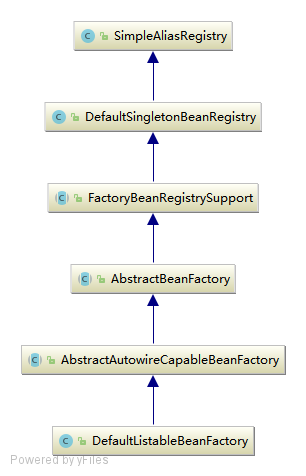
向IOC容器注册的主要源码如下:
public class DefaultListableBeanFactory extends AbstractAutowireCapableBeanFactory
        implements ConfigurableListableBeanFactory, BeanDefinitionRegistry, Serializable {

    // 存储注册信息的BeanDefinition
    private final Map<String, BeanDefinition> beanDefinitionMap = new ConcurrentHashMap<>(256);

    //---------------------------------------------------------------------
    // Implementation of BeanDefinitionRegistry interface
    //---------------------------------------------------------------------

    @Override
    public void registerBeanDefinition(String beanName, BeanDefinition beanDefinition)
            throws BeanDefinitionStoreException {

        // 校验 beanName 与 beanDefinition 非空
        Assert.hasText(beanName, "Bean name must not be empty");
        Assert.notNull(beanDefinition, "BeanDefinition must not be null");

        // 校验 BeanDefinition .
        // 这是注册前的最后一次校验了,主要是对属性 methodOverrides 进行校验.
        if (beanDefinition instanceof AbstractBeanDefinition) {
            try {
                ((AbstractBeanDefinition) beanDefinition).validate();
            } catch (BeanDefinitionValidationException ex) {
                throw new BeanDefinitionStoreException(beanDefinition.getResourceDescription(), beanName,
                        "Validation of bean definition failed", ex);
            }
        }

        // 从缓存中获取指定 beanName 的 BeanDefinition
        BeanDefinition existingDefinition = this.beanDefinitionMap.get(beanName);
        // 如果已经存在
        if (existingDefinition != null) {
            // 如果存在但是不允许覆盖,抛出异常
            if (!isAllowBeanDefinitionOverriding()) {
                throw new BeanDefinitionOverrideException(beanName, beanDefinition, existingDefinition);
            // 覆盖 beanDefinition 大于 被覆盖的 beanDefinition 的 ROLE ,打印 info 日志
            } else if (existingDefinition.getRole() < beanDefinition.getRole()) {
                // e.g. was ROLE_APPLICATION, now overriding with ROLE_SUPPORT or ROLE_INFRASTRUCTURE
                if (logger.isInfoEnabled()) {
                    logger.info("Overriding user-defined bean definition for bean '" + beanName +
                            "' with a framework-generated bean definition: replacing [" +
                            existingDefinition + "] with [" + beanDefinition + "]");
                }
            // 覆盖 beanDefinition 与 被覆盖的 beanDefinition 不相同,打印 debug 日志
            } else if (!beanDefinition.equals(existingDefinition)) {
                if (logger.isDebugEnabled()) {
                    logger.debug("Overriding bean definition for bean '" + beanName +
                            "' with a different definition: replacing [" + existingDefinition +
                            "] with [" + beanDefinition + "]");
                }
            // 其它,打印 debug 日志
            } else {
                if (logger.isTraceEnabled()) {
                    logger.trace("Overriding bean definition for bean '" + beanName +
                            "' with an equivalent definition: replacing [" + existingDefinition +
                            "] with [" + beanDefinition + "]");
                }
            }
            // 允许覆盖,直接覆盖原有的 BeanDefinition 到 beanDefinitionMap 中.
            this.beanDefinitionMap.put(beanName, beanDefinition);
        // 如果未存在
        } else {
            // 检测创建 Bean 阶段是否已经开启,如果开启了则需要对 beanDefinitionMap 进行并发控制
            if (hasBeanCreationStarted()) {
                // beanDefinitionMap 为全局变量,避免并发情况, 保证数据的一致性
                // Cannot modify startup-time collection elements anymore (for stable iteration)
                synchronized (this.beanDefinitionMap) {
                    // 添加到 BeanDefinition 到 beanDefinitionMap 中.
                    this.beanDefinitionMap.put(beanName, beanDefinition);
                    // 添加 beanName 到 beanDefinitionNames 中
                    List<String> updatedDefinitions = new ArrayList<>(this.beanDefinitionNames.size() + 1);
                    updatedDefinitions.addAll(this.beanDefinitionNames);
                    updatedDefinitions.add(beanName);
                    this.beanDefinitionNames = updatedDefinitions;
                    // 从 manualSingletonNames 移除 beanName
                    if (this.manualSingletonNames.contains(beanName)) {
                        Set<String> updatedSingletons = new LinkedHashSet<>(this.manualSingletonNames);
                        updatedSingletons.remove(beanName);
                        this.manualSingletonNames = updatedSingletons;
                    }
                }
            } else {
                // Still in startup registration phase
                // 添加到 BeanDefinition 到 beanDefinitionMap 中.
                this.beanDefinitionMap.put(beanName, beanDefinition);
                // 添加 beanName 到 beanDefinitionNames 中
                this.beanDefinitionNames.add(beanName);
                // 从 manualSingletonNames 移除 beanName
                this.manualSingletonNames.remove(beanName);
            }

            this.frozenBeanDefinitionNames = null;
        }

        // 检查是否有同名的BeanDefinition已经在IOC容器中注册
        if (existingDefinition != null || containsSingleton(beanName)) {
            // 重新设置 beanName 对应的缓存
            resetBeanDefinition(beanName);
        }
    }
}
至此,Bean定义资源文件中配置的Bean被解析过后,已经注册到IOC容器中,被容器管理起来,真正完成了IOC容器初始化所做的全部工作.
现在IOC容器中已经建立了整个Bean的配置信息,这些BeanDefinition信息已经可以使用,并且可以被检索,IOC容器的作用就是对这些注册的Bean定义信息进行处理和维护.这些的注册的Bean定义信息是IOC容器控制反转的基础,正是有了这些注册的数据,容器才可以进行依赖注入.
总结: 现在通过上面的代码,总结一下IOC容器初始化的基本步骤:
- 初始化的入口在容器实现中的
refresh()调用来完成 - 对bean定义载入IOC容器使用的方法是
loadBeanDefinition- 通过
ResourceLoader来完成资源文件位置的定位DefaultResourceLoader是默认的实现,同时上下文本身就给出了ResourceLoader的实现,可以从类路径,文件系统,URL等方式来定为资源位置- 如果是
XmlBeanFactory作为IOC容器,那么需要为它指定bean定义的资源,也就是说bean定义文件时通过抽象成Resource来被IOC容器处理的
- 容器通过
BeanDefinitionReader来完成定义信息的解析和Bean信息的注册- 往往使用的是
XmlBeanDefinitionReader来解析bean的xml定义文件,实际的处理过程是委托给BeanDefinitionParserDelegate来完成的
- 往往使用的是
- 得到bean的定义信息
- 这些信息在Spring中使用
BeanDefinition对象来表示-这个名字可以让我们想到loadBeanDefinition,RegisterBeanDefinition这些相关方法-他们都是为处理BeanDefinitin服务的
- 这些信息在Spring中使用
- 容器解析得到BeanDefinition以后,需要把它在IOC容器中注册
- 由IOC实现
BeanDefinitionRegistry接口来实现 - 注册过程就是在IOC容器内部维护的一个
HashMap来保存得到的BeanDefinition的过程 - 这个
HashMap是IOC容器持有Bean信息的场所,以后对Bean的操作都是围绕这个HashMap来实现的
- 由IOC实现
- 通过
然后我们就可以通过BeanFactory和ApplicationContext来享受到Spring IOC的服务了.
在使用IOC容器的时候,我们注意到除了少量粘合代码,绝大多数以正确IOC风格编写的应用程序代码完全不用关心如何到达工厂,因为容器将把这些对象与容器管理的其他对象钩在一起.基本的策略是把工厂放到已知的地方,最好是放在对预期使用的上下文有意义的地方,以及代码将实际需要访问工厂的地方.Spring本身提供了对声明式载入web应用程序用法的应用程序上下文,并将其存储在ServletContext中的框架实现.
以下是容器初始化全过程的时序图:

区别BeanFactory和FactoryBean两个概念
BeanFactory指的是IOC容器的编程抽象,比如ApplicationContext,XmlBeanFactory等,这些都是IOC容器的具体表现,需要使用什么样的容器由客户决定,但Spring为我们提供了丰富的选择.FactoryBean只是一个可以在IOC而容器中被管理的一个Bean,是对各种处理过程和资源使用的抽象FactoryBean在需要时产生另一个对象,而不返回FactoryBean本身,我们可以把它看成是一个抽象工厂,对它的调用返回的是工厂生产的产品.- 所有的
FactoryBean都实现特殊的org.springframework.beans.factory.FactoryBean接口,当使用容器中FactoryBean的时候,该容器不会返回FactoryBean本身,而是返回其生成的对象. - Spring 包括了大部分的通用资源和服务访问抽象的
FactoryBean的实现,其中包括:- 对JNDI查询的处理
- 对代理对象的处理
- 对事务性代理的处理
- 对RMI代理的处理等
- 这些我们都可以看成是具体的工厂,看成是Spring为我们建立好的工厂
- 也就是说Spring通过使用抽象工厂模式为我们准备了一系列工厂来生产一些特定的对象,免除我们手工重复的工作,我们要使用时只需要在IOC容器里配置好就能很方便的使用了.